
For the kitchen
Kitchen displayEvery order, the moment it comes in
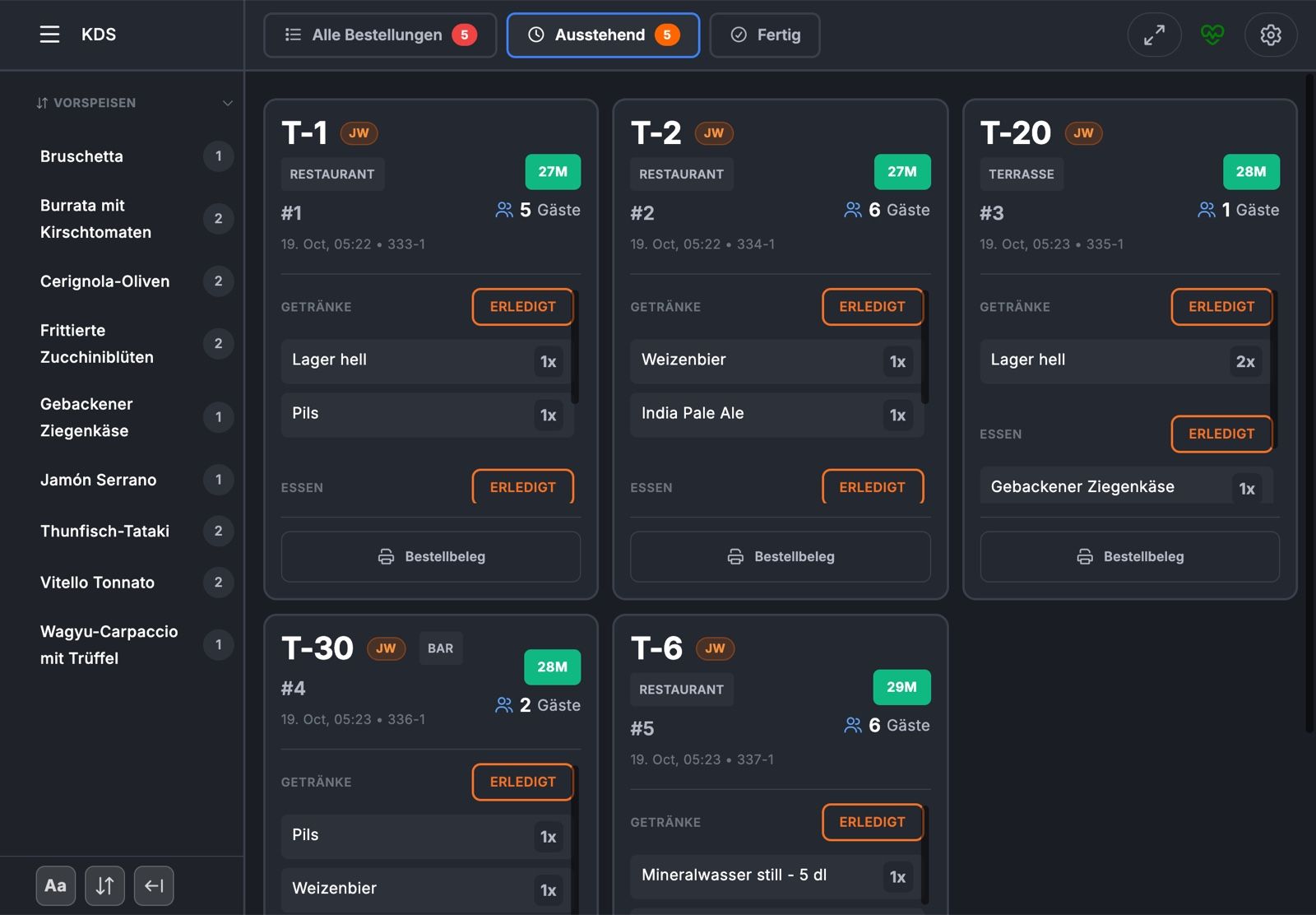
The kitchen display shows every order as a card, in real time and from every channel: at the table, by QR code, from the kiosk, for pickup, for delivery and from Uber Eats. The kitchen sees what is up next, how much time is left and which course is coming.
- In real time
- new orders with a sound and an alert
- By course
- every course with its own Done button
- Two stations
- food and drinks on separate screens
How the kitchen works with it
From new order to «Done»
Order cards
Everything on one card
Table and area, the room number in a hotel, the type of order for pickup and delivery. Plus the time, number of guests, extras as chips and comments on single items or on the whole order.
Waiting time
Colours show what is urgent
Every card counts down to its planned ready time. When time gets tight, the display turns yellow, and red just before. Overdue orders pulse.
Courses
The next course announces itself
When the service team sends the next course, an alert appears on the kitchen display, along with a sound.
New order
Impossible to miss
New orders arrive with a sound and an alert until someone confirms them.
Setup
How it fits your kitchen
Separate food and drinks
Each screen shows all items, only food or only drinks. In station mode, an order is done for the kitchen as soon as its food is ready, while the bar keeps working on the drinks.
Open items at a glance
A bar counts how many portions per product are still open, by category. One tap filters the cards to that product.
Readable from a distance
Adjustable font size for products and extras, light or dark mode, full screen. Language: German, English or Italian.
Pause pickup and delivery
When things get busy, the kitchen pauses new pickup and delivery orders right on the kitchen display.
What is done
A separate tab shows the completed orders of the current day.
Tickets when needed
Any card can be printed as a ticket, for the station that prefers paper.
Working together
From ordering to the pass
- ServiceJamWaiter
orders at the table and sends the courses
- GuestsJamOrder
order by QR code, for pickup or delivery
- KioskJamKiosk
orders to eat in or take away
- KitchenKitchen display
sees every order in real time
- TicketPrinters for kitchen and bar
paper for the stations that need it
Frequently asked questions
Questions about the kitchen display
Which orders appear on the kitchen display?
Orders from JamWaiter at the table, from JamOrder by QR code, for pickup and for delivery, from JamKiosk and from Uber Eats. Each card shows where it comes from.
Can I separate kitchen and bar?
Yes. Each screen shows all items, only food or only drinks. In station mode, each station completes its part without blocking the other.
How does the kitchen mark something as done?
With the Done button for the whole order, for food or drinks, or for a single course. Completed items are crossed out.
What happens when a new order comes in?
It appears immediately as a card, along with a sound and an alert, until someone confirms it.
Do I still need a printer?
No. If a station prefers paper, it prints the card as a ticket.
Demo
See Jamatu for yourself
In our demo you click your way through the floor plan, courses and payment all the way to the end-of-day closing. Once you sign up, we activate your access.
- Free and with no obligation
- In your browser, no installation