






For guests and back office
VouchersSell at the counter, online and by payment link
Vouchers are built into JamWaiter and OrderAdmin. You sell them at the till, guests buy them on your website, and they are redeemed by code, even across several visits. No add-on module and no extra charge.
- No extra charge
- part of JamWaiter and OrderAdmin
- Three ways
- at the counter, on your website, by payment link
- Partial redemption
- the remaining balance stays on the voucher
Selling
Three ways to sell a voucher
Wherever a voucher is sold, it ends up in the same system and is redeemed at the till in the same way.
On your website
Guests buy online
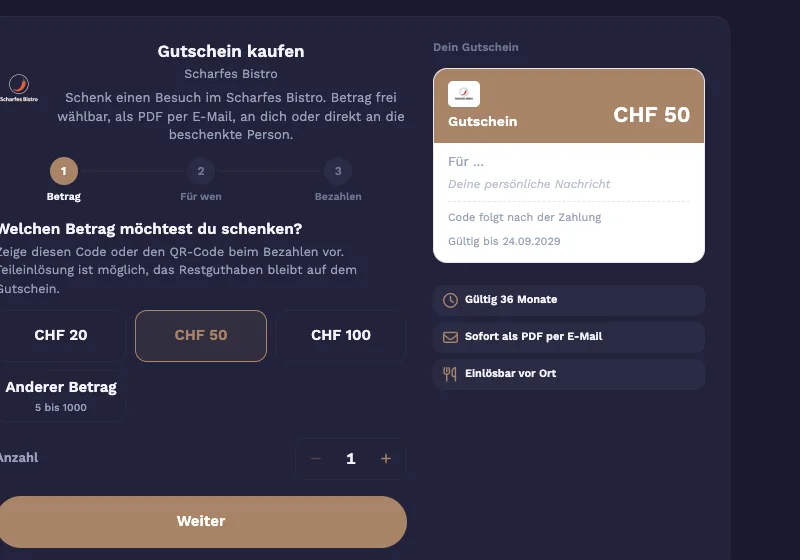
In the widget, the guest chooses an amount and a message and pays through your payment provider. They receive the voucher as a PDF by email. You will find the embed code in OrderAdmin.
At the counter
Sell it like any other item
In JamWaiter, choose the amount, add a name and message, and take payment. The guest receives the voucher as a QR code, printed or by email.
By payment link
For requests by phone or email
From a contact in OrderAdmin. The code and PDF are sent once payment is made, on a chosen day if you like.
Gift or goodwill
Issue without a sale
In OrderAdmin you issue vouchers as a gift or as a goodwill gesture.
Redemption and overview
From redemption to closing
Redeem by code
Scan or type in the code. If only part is redeemed, the remaining balance stays on the voucher.
All vouchers at a glance
In OrderAdmin you see every voucher with its status. You can cancel it or send it again.
Know the open amounts
A report shows how much voucher credit is still outstanding, with export to Excel.
Correct in the daily closing
No VAT is due when the voucher is sold, it is taxed on redemption. Voucher sales appear in the daily closing separately from revenue.
Working together
Who does what with vouchers
- ServiceJamWaiter
sells at the counter and redeems codes
- GuestsVouchers
buy on your website
- Back officeOrderAdmin
overview, payment links and report
Frequently asked questions
Questions about vouchers
Does the voucher feature cost extra?
No. Vouchers are part of JamWaiter and OrderAdmin, with no add-on module and no extra charge.
Can a voucher be redeemed over several visits?
Yes. If only part is redeemed, the remaining balance stays on the voucher.
How does the guest receive the voucher?
At the counter as a QR code, printed or by email. Vouchers bought online arrive as a PDF by email.
Can I sell vouchers on my website?
Yes, with the voucher widget. You will find the embed code in OrderAdmin, and payment goes through your payment provider.
How are vouchers booked?
No VAT is due when the voucher is sold, it is taxed on redemption. In the daily closing, voucher sales appear separately from revenue.
Demo
See Jamatu for yourself
In our demo you click your way through the floor plan, courses and payment all the way to the end-of-day closing. Once you sign up, we activate your access.
- Free and with no obligation
- In your browser, no installation