






For guests and service
ReservationsBooked online, visible to your team right away
Jamatu has its own reservation system. Guests book through the widget on your website, and your team sees the day's reservations right in JamWaiter, next to the table overview. With status, the guest's requests and notes for the team.
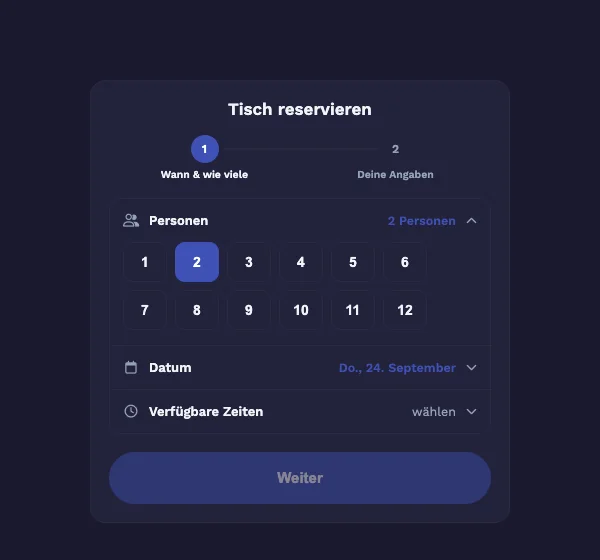
- Book online
- with the widget on your website
- In the cockpit
- the day's reservations next to the tables
- Day, week, month
- groups of ten or more highlighted
During service
The reservation is where the work happens
Cockpit in JamWaiter
The day's reservations as cards
Every reservation has a status: pending, confirmed, seated, overdue, no table or completed. VIP and note flags appear right on the card.
Planning
Day, week and month
The reservation overview in JamWaiter shows day, week and month. In the month view you see the guests per day, and days with a group of ten or more are marked in purple.
Requests
What the guest wrote
The comment from the online booking appears for the service team. Online bookings are automatically linked to the contact.
With Jonida
Set the status in a conversation
Jonida sets a reservation to confirmed, arrived or no-show, but only after you confirm.
More than tables
For restaurant, hotel and spa
Tables
Guests choose the number of people, the date and a free time, then enter their details.
Spa appointments
Spa appointments can also be booked as reservations.
Allergies at a glance
With the Personal Dining Experience in JamWaiter, your team also sees allergies from the guest profile. It can be switched on per venue.
Working together
From booking to the table
- GuestsReservations
book online on your website
- ServiceJamWaiter
sees and seats the reservations
- AssistantJonida
sets the status once you confirm
- Back officeOrderAdmin
contacts and embed code
Frequently asked questions
Questions about reservations
How do my guests make a reservation?
Through the reservation widget on your website. You will find the embed code in OrderAdmin.
Where does my team see the reservations?
In JamWaiter: in the cockpit next to the table overview for today, and in the reservation overview with day, week and month views.
Can I see what the guest wrote when booking?
Yes. The comment from the online booking appears for the service team, along with notes from your team.
Can guests also book spa appointments?
Yes. Besides tables, spa appointments can also be booked as reservations.
Demo
See Jamatu for yourself
In our demo you click your way through the floor plan, courses and payment all the way to the end-of-day closing. Once you sign up, we activate your access.
- Free and with no obligation
- In your browser, no installation